
◆ Study Hacks
How do you make a revision timetable that you can stick to?
Last updated: 2026-10-23
Category: study-hacks

A revision timetable fails for one of two reasons: it was built from hope instead of from the hours you really have, or it was built once and never looked at again. Searches for a template, a printable, a PDF, a maker or an app are all attempts to skip the building step, but the building is the useful part. This guide shows how to build the timetable itself, step by step, using advice published by the Open University, the University of Sussex, the University of Sheffield and UCL, plus one finding on how far apart to space your sessions.
Direct answer: List every exam and its topics, count the hours you really have, then work backwards from each exam date. Give more time to topics you rate as weak, spread each topic over several days, keep sessions short with breaks, and leave spare slots. Review the plan once a week and adjust it.
◆ Question 1 / 9 · What do you need to know
What do you need to know before you build a revision timetable?
Direct answer: You need four things on one page: every exam date and time, the topics each exam covers, your fixed commitments such as classes, work and family, and a rough rating of how well you know each topic. The timetable is only a way of arranging these facts.
The Open University (n.d.) suggests noting the exam date and time, your work and family demands, the number of weeks, days and hours available, and the number of blocks or units you have to revise. The University of Sheffield (n.d.) starts one step earlier, with an exam mapping template, and only then moves to a realistic revision timetable. The order matters. If you start by drawing a grid and filling it with subject names, you are guessing how much each subject needs.
A useful first draft is a plain list. For each exam, write the date, then every topic you could be asked about, then a confidence score from 1 (I could not explain this) to 5 (I could teach this). The University of Sussex (n.d.) uses exactly this 1 to 5 rating and recommends giving more time to low-confidence topics.
◆ Question 2 / 9 · How many hours do you really
How many hours do you really have for revision?
Direct answer: Start from a blank week of all your waking hours, block out everything fixed, and count what remains. Be honest about meals, sleep, travel, work and rest. The number you end with is your real budget, and it is usually smaller than the number you hoped for.
The University of Sussex (n.d.) begins its twelve-step plan with a blank timetable of all waking hours, then marks fixed responsibilities such as lectures and work, then lists flexible activities such as exercise and seeing friends. The Open University (n.d.) says to "decide how many hours you have for revision and allocate them accordingly", and to include time to eat, sleep and relax. It also warns you to avoid being over-ambitious.
Count in sessions, not in hours. If one session is 45 minutes of work plus a 15-minute break, as Sussex suggests, one session fills one hour of the clock. Three sessions on a day is three hours, so a five-day revision week gives you 15 sessions. Once you know your weekly total, you can divide it between exams and topics with simple arithmetic instead of with feelings.
◆ Question 3 / 9 · How do you split your time
How do you split your time between exams and topics?
Direct answer: Work backwards from the exam dates. Prioritise each exam by how soon it falls and how much revision it needs, then share that exam's sessions across its topics, giving the lowest-confidence topics the largest share. Alternate easy and difficult topics so a day does not feel like one long struggle.
Sheffield (n.d.) advises a timetable that works backwards from your exam dates and builds in contingency time for the unforeseen. UCL (n.d.) tells students to look through the assessment timetable and prioritise each assessment "based on when it is and how much revision it needs", and to plan for two assessments on one day. UCL also suggests alternating easy and difficult topics.
In practice, give each topic a weight. A topic rated 1 or 2 gets three sessions, a topic rated 3 gets two, and a topic rated 4 or 5 gets one. Add the weights for an exam, compare the total with the sessions you have, and trim or extend until the two numbers match. A total far above your budget is worth knowing four weeks out, not four days.
◆ Question 4 / 9 · How far ahead should you
How far ahead should you start, and how big should the gaps be?
Direct answer: Start as early as your hours allow and meet each topic on several separate days, never in one block. The best gap between sessions depends on how long you need to remember the material, so a near exam calls for short gaps and a distant exam for longer ones.
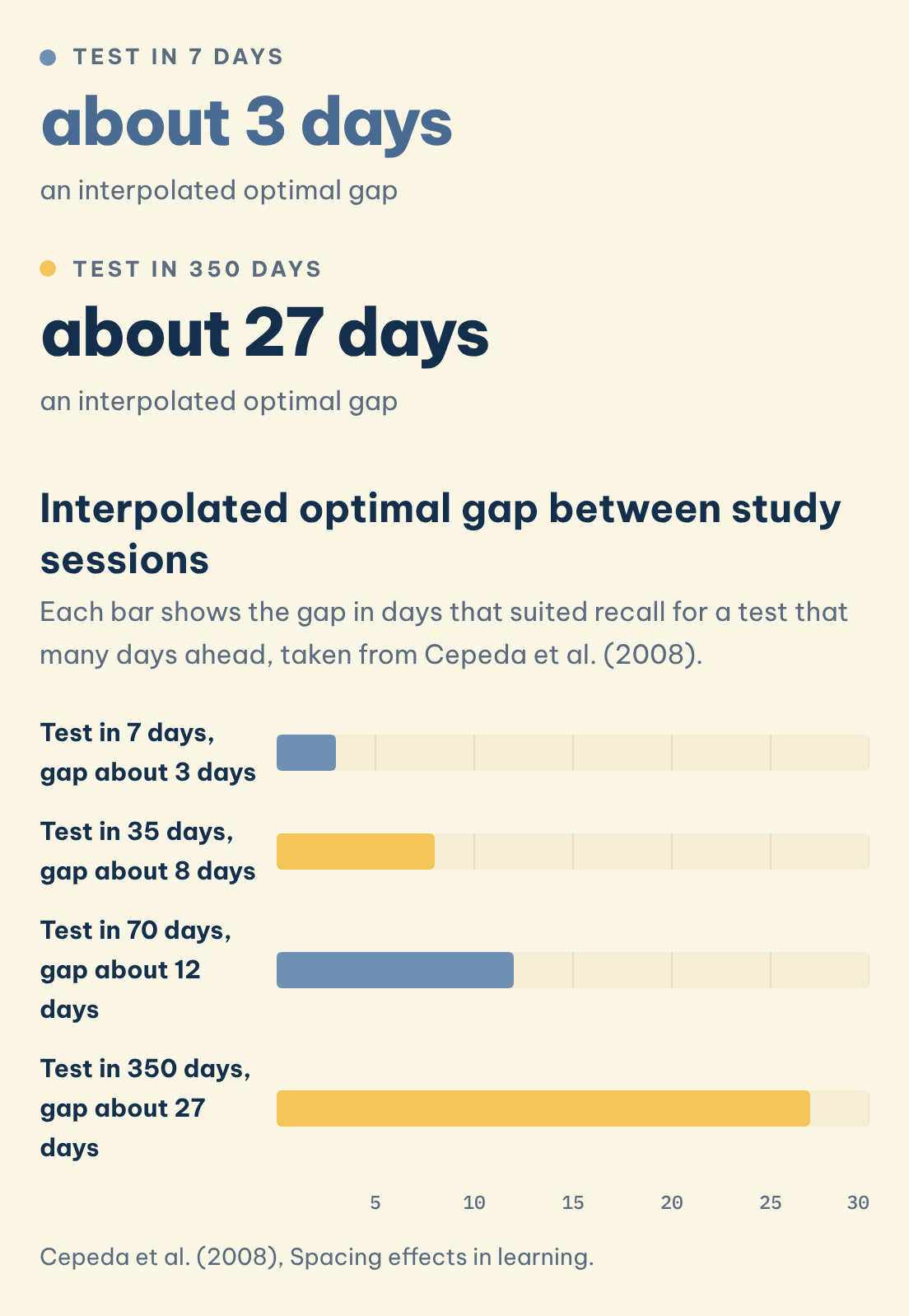
Cepeda et al. (2008), writing in Psychological Science, studied more than 1,350 people with gaps of up to 3.5 months and a final test up to a year later. They report that "the optimal gap declined from about 20 to 40% of a 1-week test delay to about 5 to 10% of a 1-year test delay" (Cepeda et al., 2008, p. 1095). In the Results of the published paper, the authors interpolate optimal gaps of about 3, 8, 12 and 27 days for test delays of 7, 35, 70 and 350 days; the 3-day figure is 43% of a 1-week delay, a little above the rounded range in the abstract. For the same total study time, the best gap raised final recall by 64% compared with a gap of zero days. They also write that the costs of a too-long gap are much smaller than the costs of a too-short gap, so when unsure, leave more space, not less.
For a timetable, this means returning to a topic after a few days instead of the next day, then again later. Carpenter, Pan and Butler (2022) note that effective strategies such as spacing are underused by learners, which is one reason a written plan helps: it makes the gaps visible. How to revise inside each session is a different question, covered in how to revise for final exams effectively.
Test in 7 days
about 3 days
an interpolated optimal gap
Test in 350 days
about 27 days
an interpolated optimal gap
Interpolated optimal gap between study sessions
Each bar shows the gap in days that suited recall for a test that many days ahead, taken from Cepeda et al. (2008).
Save this figure
◆ Question 5 / 9 · How long should each
How long should each revision session be?
Direct answer: Aim for sessions of about 45 minutes with a 15-minute break, or short bursts of 30 minutes to an hour, each with one specific goal. Do not fill every slot, and build in whole days off, because a plan with no rest in it rarely survives the second week.
The University of Sussex (n.d.) recommends 45-minute sessions with a 15-minute break in between, and advises not filling every slot so that the plan stays flexible. UCL (n.d.) suggests studying in short, concentrated bursts of 30 minutes or an hour, with short breaks, and setting realistic, specific and measurable goals for each session. A goal such as "finish the three practice questions on regression" is checkable at the end; "do statistics" is not.
Sheffield (n.d.) also asks for plenty of time for breaks, including whole days off. These are part of the schedule, not rewards. A timetable with no rest usually collapses in week 2, and the guilt makes week 3 worse. The Open University (n.d.) adds a reassurance for bad weeks: ten minutes of revision each day is much better than none.
◆ Question 6 / 9 · What does a worked revision
What does a worked revision timetable look like?
Direct answer: The example below is an illustration, not a prescription. It covers three exams over four weeks with five study days a week and three sessions a day, so every week has 15 sessions: 12 for topics, 1 for review and 2 as buffer.
Imagine one student with three exams: Statistics (the weakest subject), Economics and Law. She studies five days a week, three 45-minute sessions a day, which is 15 sessions a week. Each week she keeps one session for a weekly review and two as buffer, leaving 12 topic sessions. Over the four weeks that is 60 sessions in all: 48 for topics, 4 for reviews and 8 as buffer. She gives Statistics the biggest share at the start because it is the weakest: 20 of the 48 topic sessions, about 42%, against 16 for Economics (one third) and 12 for Law (one quarter). Law's weekly share then rises from 2 sessions in week 1 to 4 in week 4 as that exam approaches.
| Week | Statistics | Economics | Law | Weekly review | Buffer | Total |
|---|---|---|---|---|---|---|
| 1 | 6 | 4 | 2 | 1 | 2 | 15 |
| 2 | 5 | 4 | 3 | 1 | 2 | 15 |
| 3 | 5 | 4 | 3 | 1 | 2 | 15 |
| 4 | 4 | 4 | 4 | 1 | 2 | 15 |
| Total | 20 | 16 | 12 | 4 | 8 | 60 |
Inside each week, the sessions for one subject are spread across different days, not stacked together, and the review session on the last study day is used to re-rate confidence. The Open University (n.d.) advises allowing a day or so immediately before the exam to review material, not to keep trying to cover new ground, so the last day before each exam sits outside this grid as a review day.
◆ Question 7 / 9 · Should you use a template
Should you use a template, a printable, a maker or an app?
Direct answer: Use whichever one you will open every day. A paper template or printable grid is fast to start and easy to see on a wall. A maker or app can reschedule for you. None of them decides how many hours each topic needs, so do the counting first.
Many universities publish their own templates. The University of Sussex (n.d.) offers one as a Word document or a PDF, and Sheffield (n.d.) points students to the Get Revising online revision planner and to Calendarpedia templates. If you search for a "revision timetable maker" or a "revision timetable PDF", these are the kinds of tools you will meet. Sheffield (n.d.) also notes that generative AI can draft a timetable, but advises always reviewing the output critically. A tool does not know your confidence ratings or your fixed commitments.
Paper helps when you want to see the whole month at once. An app helps when your days keep changing, because moving a missed session is one tap. Choose by the problem you actually have. If you want a second pair of eyes, MAAS tutors can help you plan and check your timetable in 1-on-1 university subject tutoring; the revision itself stays yours.
◆ Question 8 / 9 · Does the same method work
Does the same method work for GCSE and A level?
Direct answer: Yes. The steps do not depend on the level: list the exams and topics, count your hours, rate your confidence, work backwards from the dates, space the sessions and review weekly. Only the numbers change, such as how many subjects you have and how many hours school leaves free.
This guide uses university sources, so check the advice from your own school or exam board for the specific rules of your qualification, such as exam dates and timetable clashes. The planning logic is the same. A GCSE or A level student with six subjects will simply have more rows in the inventory and fewer hours per subject, which makes the honest hour count and the confidence ratings even more important.
◆ Question 9 / 9 · How do you keep
How do you keep the timetable working after the first week?
Direct answer: Review it at the end of every week. Compare what you planned with what you did, re-rate your confidence, move missed sessions into the buffer slots, and rewrite next week. A timetable that is updated weekly stays realistic, and a missed day becomes a small adjustment instead of a failure.
The University of Sussex (n.d.) ends its twelve steps with a review of the plan at the end of each week. Sheffield (n.d.) builds contingency time into the plan from the start. Together these two habits solve the most common problem, which is that real weeks never match the plan. In the worked example above, each week carries two buffer sessions out of 15, which is about one in seven.
A short weekly routine works well: ten minutes on the last study day to tick off what was done, re-score each topic from 1 to 5, and move any unfinished sessions. If two weeks in a row go badly, shrink the plan instead of pretending it still fits, as the Open University (n.d.) warns against being over-ambitious.
Frequently asked questions
How do you make a revision timetable?
List your exams and topics, count your available hours after fixed commitments, rate your confidence in each topic, and work backwards from the exam dates, giving more time to weaker topics and leaving some slots free (University of Sussex, n.d.).
How many hours a day should you revise?
There is no single figure. The Open University (n.d.) says to decide how many hours you have and allocate them accordingly, including time to eat, sleep and relax, and to avoid being over-ambitious.
How long should a revision session be?
The University of Sussex (n.d.) suggests 45-minute sessions with a 15-minute break, and UCL (n.d.) suggests bursts of 30 minutes or an hour with short breaks.
How far ahead should you start revising?
As early as your hours allow. Cepeda et al. (2008) found that the ideal spacing is tied to the length of the delay before the test, so plan to revisit topics over several weeks instead of one block.
Should I use a revision timetable app or paper?
Either works if you use it daily. Universities such as Sussex and Sheffield offer templates and point to planners, but the counting of hours and the confidence ratings are the part no tool does for you.
Can AI make my revision timetable?
It can draft one, but Sheffield (n.d.) advises always reviewing the output critically. A tool does not know your fixed commitments or how confident you are in each topic.
Related MAAS guides
References
Carpenter, S. K., Pan, S. C., & Butler, A. C. (2022). The science of effective learning with spacing and retrieval practice. Nature Reviews Psychology, 1(9), 496-511. https://doi.org/10.1038/s44159-022-00089-1
Cepeda, N. J., Vul, E., Rohrer, D., Wixted, J. T., & Pashler, H. (2008). Spacing effects in learning: A temporal ridgeline of optimal retention. Psychological Science, 19(11), 1095-1102. https://doi.org/10.1111/j.1467-9280.2008.02209.x
The Open University. (n.d.). Making a timetable: Preparing for revision. https://help.open.ac.uk/preparing-for-revision/making-a-timetable
The University of Sheffield. (n.d.). How to revise effectively. StudySkills@Sheffield. https://sheffield.ac.uk/study-skills/assessment/revision-exams/effective
UCL. (n.d.). Effective revision and assessment planning. https://www.ucl.ac.uk/study/current-students/exams-and-assessments/assessment-success-guide/effective-revision-and-assessment-planning
University of Sussex. (n.d.). Revision and exams. Skills Hub. https://www.sussex.ac.uk/skills-hub/revision-and-exams
Not sure how this guide applies to your own case? Talk it through with MAAS in a free 20-minute consultation.
Book a free consultation ▸