
◆ Research Methods
How do you read a z table for the standard normal distribution?
A z table, or standard normal distribution table, turns a z-score into the share of the normal curve that lies below, above or between values. Reading one takes three moves: find the row for the first decimal, find the column for the second decimal, then check which area your printed table actually reports.
Direct answer: Split your z-score into its first and second decimal. Go down the left column to the first part, across the top row to the second, and read the cell where they meet. That cell is an area under the curve, so check whether your table reports the area left of z or from 0 to z.
◆ Question 1 / 7 · What the table shows
What does a standard normal distribution table actually show?
Direct answer: A standard normal table lists areas under the normal curve with a mean of 0 and a standard deviation of 1. Each area is a probability, so the cell next to a z-score tells you what proportion of values falls in a stated region, usually below that z-score.
The table exists because the normal curve has no simple formula for its areas. The NIST/SEMATECH e-Handbook explains that the cumulative normal integral "cannot be evaluated in closed form", so statisticians convert any normal variable into a z-score with z = (x − μ) / σ and look up one shared table instead of a table for every mean and standard deviation (NIST/SEMATECH, n.d.-b). This is why a dissertation student who measures exam marks, reaction times or blood pressure can use the same printed page. The whole curve has an area of 1, and because the curve is symmetric about 0, exactly half of that area, 0.5, lies on each side of the mean (Illowsky & Dean, 2023). Most of the tricks for reading a table come from those two facts.
◆ Question 2 / 7 · Row and column
How do you find a z score in the table, row by row?
Direct answer: Write the z-score to two decimal places first. The row label carries the whole number and the first decimal, while the column heading carries the second decimal. The cell at the crossing is your area, and for z = 1.53 you would read row 1.5 and column 0.03 to find it.
Three z table types, one z-score
What the cell for z = 1.53 means in each common table type.
Table type
Cell for z = 1.53
Cumulative, area to the left of z
P(Z ≤ 1.53) = 0.93699
From the mean, area from 0 to z
P(0 ≤ Z ≤ 1.53) = 0.43699
Complementary, area to the right of z
P(Z ≥ 1.53) = 0.06301
Save this figure
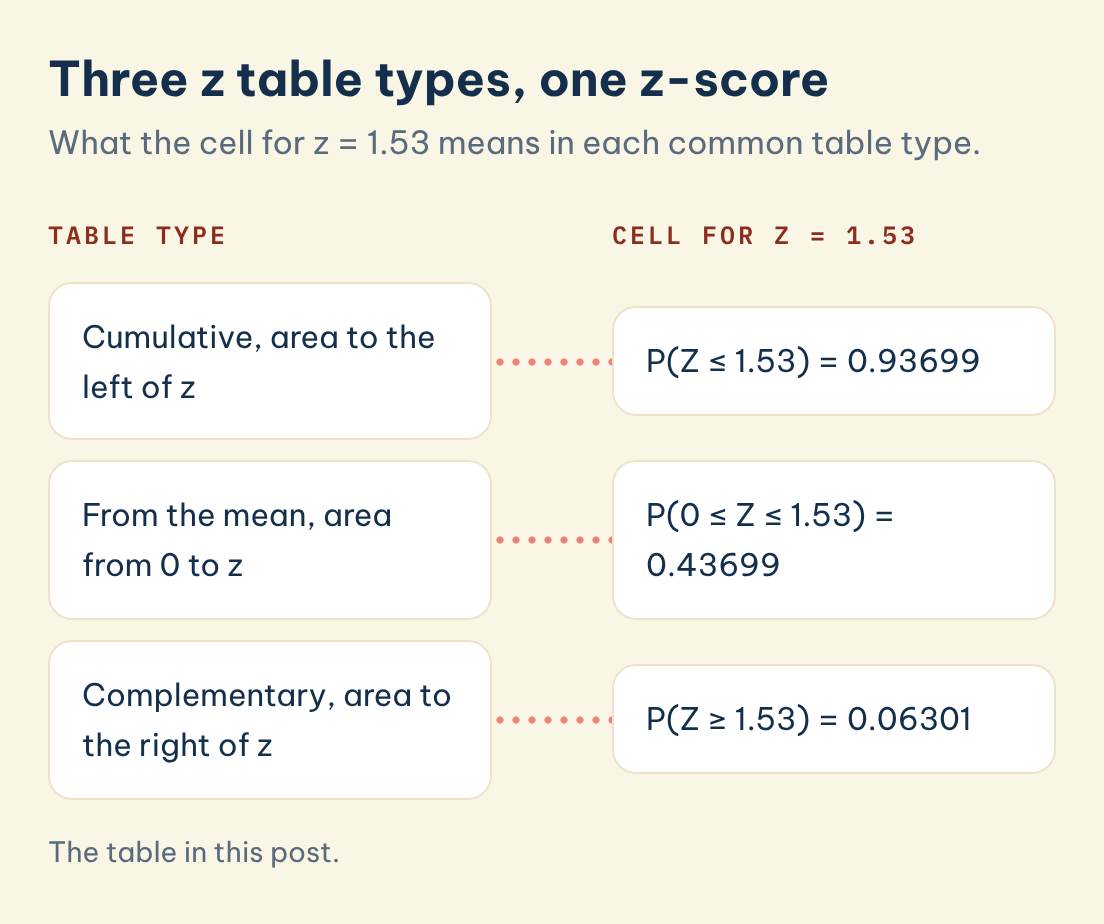
Take z = 1.53. Go down the left-hand column to 1.5, then across to the column headed 0.03. In a cumulative table, which gives the area to the left of z, the cell reads 0.93699, so about 93.7% of a standard normal population sits below 1.53 (University of Arizona, n.d.). The same cell in a table from the mean reads 0.43699, exactly 0.5 lower, because that half of the curve to the left of the mean is left out (NIST/SEMATECH, n.d.-a).
| Table type | What the cell for z = 1.53 means | Value |
|---|---|---|
| Cumulative (area to the left of z) | P(Z ≤ 1.53) | 0.93699 |
| From the mean (area from 0 to z) | P(0 ≤ Z ≤ 1.53) | 0.43699 |
| Complementary (area to the right of z) | P(Z ≥ 1.53) | 0.06301 |
◆ Question 3 / 7 · Negative z-scores
How do you read negative and positive values on a z table?
Direct answer: Many printed tables show both halves, with the negative rows listed above zero. If yours shows only positive z-scores, use the symmetry of the curve: the area below −z equals the area above +z. Read the positive value, then subtract it from 1 to get the area below the negative z-score.
For z = −1.53, the NIST handbook applies the rule P(Z ≤ −a) = 1 − P(Z ≤ a). Since the area below +1.53 is 0.93699, the area below −1.53 is 1 − 0.93699 = 0.06301 (NIST/SEMATECH, n.d.-a). A two-sided table such as the University of Arizona sheet prints that value directly in the −1.5 row and 0.03 column (University of Arizona, n.d.). Students most often slip when they read a positive table, forget the subtraction, and report 0.937 for a z-score that sits far below the mean. A quick sanity check catches it: any negative z-score must give a cumulative area below 0.5.
◆ Question 4 / 7 · 0 to Z tables
What is a "0 to Z" table, and how is it different?
Direct answer: A "0 to Z" table, also called "cumulative from the mean", gives only the area between the mean and your z-score. It leaves out the half of the curve below the mean, so add 0.5 to its reading whenever you need the full area below a positive z-score in a cumulative sense.
The NIST table is of this type. Its own instructions read across to 0.43699 for z = 1.53 and then add 0.5 "for the probability less than zero" to reach 0.93699 (NIST/SEMATECH, n.d.-a). The University of Toronto economics course sheet uses the same one-page layout, where z = 1.16 gives P(0 < Z < 1.16) = 0.3770 (Murdock, n.d.). Before you copy a number into your methods chapter, read the small diagram or sentence at the top of the page, because it states which area the cells hold. OpenStax puts it plainly: most tables show the area to the left of z, while "others show the mean to z area" (Illowsky & Dean, 2023).
◆ Question 5 / 7 · Area between two z
How do you find the area between two z scores?
Direct answer: Find the cumulative area for each of the two z-scores, then subtract the smaller value from the larger one. The difference is the probability that a value falls between them. For the area above a single z-score, subtract its cumulative value from 1 instead, which gives the right-hand tail.
For the region between z = −1 and z = 0.5, the NIST handbook gives a cumulative area of 0.69146 for 0.5 and 0.15866 for −1, so the area between them is 0.69146 − 0.15866 = 0.5328 (NIST/SEMATECH, n.d.-a). The same subtraction gives the well-known 68% rule: 0.8413 below +1 minus 0.1587 below −1 leaves 0.6826 within one standard deviation of the mean. For an area above a z-score, subtract the cumulative value from 1, as in the complementary row of the table above.
◆ Question 6 / 7 · Critical z values
How do you work backwards from an area to a critical z value?
Direct answer: Search inside the body of the table for the area you need, then read off the row and column labels that frame it. For a two-tailed test at the 5% level, the cumulative area 0.975 sits at z = 1.96, which is the critical value most dissertations quote.
The NIST handbook lists the critical values used in significance tests: 1.645 for a cumulative area of 0.95, 1.960 for 0.975, 2.326 for 0.99 and 2.576 for 0.995 (NIST/SEMATECH, n.d.-a). When the exact area is not printed, take the nearest cell. The University of Washington tutorial finds the z-score with 5% of the area above it by locating the area beyond z closest to 0.05, which lands near 1.64 (University of Washington, 2021). A critical value only marks a cut-off, and it does not tell you how large or important a result is. The American Statistical Association warns that "Scientific conclusions and business or policy decisions should not be based only on whether a p-value passes a specific threshold" (Wasserstein & Lazar, 2016, p. 131).
◆ Question 7 / 7 · Excel, R and SPSS
Can you use a calculator, Excel or SPSS instead of a printed z table?
Direct answer: Yes. Software returns the same cumulative areas with more decimal places, and supervisors usually accept it in a dissertation. Learn the printed table anyway, because some statistics exams still hand out one sheet of values and allow no software, so you need to read the page by hand.
In Excel, NORM.S.DIST(z, TRUE) returns the area to the left of z (Microsoft, n.d.), and its companion NORM.S.INV(p) works the other way, from a cumulative area back to a z-score. In R, pnorm(1) gives 0.8413447 and qnorm(0.95) gives 1.644854, matching the printed tables. SPSS shows the same quantities through its CDF.NORMAL and IDF.NORMAL functions in Compute Variable. The University of Toronto course sheet tells students to practise with the one-page table "because that is what we give you during tests and exams" (Murdock, n.d.), a useful reminder that knowing where a number comes from still matters when the software is switched off.
Frequently asked questions
Is a z table the same as a standard normal distribution table?
Yes. "Z table", "unit normal table" and "standard normal table" all name a table of areas under the normal curve with mean 0 and standard deviation 1. The names differ by textbook, but the values agree to the decimal places printed.
Why does my z table give a different number from my classmate's?
You are probably reading two table types. A cumulative table and a "from the mean" table differ by 0.5 for any positive z-score, so 0.9370 and 0.4370 describe the same z = 1.53. Check the header diagram on each page.
What do I do if my z-score has three decimal places?
Round to two decimals for a printed table, or interpolate between the two nearest cells. For a dissertation result, report the exact value from software instead, since software does not need rounding.
What z value gives 95% confidence?
For a two-sided 95% interval, use z = 1.96, because 0.975 of the area lies below it and 2.5% sits in each tail. For a one-sided 95% bound, use 1.645.
Can I use the z table for a small sample?
Only when the population standard deviation is known or the sample is large. With a small sample and an estimated standard deviation, the t distribution is the correct reference, and its critical values are wider than the z values.
Can MAAS help me check the statistics in my dissertation?
Yes. MAAS experts guide students through choosing tests, reading SPSS, R or Python output and reporting results, while the student stays the author of the analysis. See the data analysis support page.
Need help reading your statistical output?
A z table is a small tool, but it sits under confidence intervals, z-tests and many of the p-values in a results chapter. If your output or your supervisor's comments do not line up with the table you were taught, the MAAS SPSS, R and Python analysis support pairs you with an expert who explains each number in your own data, with you working through the analysis alongside the expert at every step.
Book a free consultation with MAAS →
Related guides
- What thesis statistics help is a student allowed to get?: where support ends and your own analysis begins
- How do you choose the right statistical test for a Q1 publication?: picking the test before you look up any critical value
- SPSS, R and Python analysis support: one-to-one guidance on your own dataset
References
- University of Washington. (2021). Z-tables [Course tutorial, PSY 315]. Retrieved October 21, 2026, from https://courses.washington.edu/psy315/tutorials/z_table_tutorial.pdf
- Illowsky, B., & Dean, S. (2023). Introductory statistics 2e. OpenStax. https://openstax.org/books/statistics/pages/6-2-using-the-normal-distribution
- Microsoft. (n.d.). NORM.S.DIST function. Microsoft Support. Retrieved October 21, 2026, from https://support.microsoft.com/en-us/office/norm-s-dist-function-1e787282-3832-4520-a9ae-bd2a8d99ba88
- Murdock, J. (n.d.). Normal table: Read it, use it [Course handout, ECO220]. University of Toronto. Retrieved October 21, 2026, from https://www.economics.utoronto.ca/murdockj/eco220/normal_table_read_it_use_it.pdf
- NIST/SEMATECH. (n.d.-a). Cumulative distribution function of the standard normal distribution. In e-Handbook of statistical methods (Section 1.3.6.7.1). Retrieved October 21, 2026, from https://www.itl.nist.gov/div898/handbook/eda/section3/eda3671.htm
- NIST/SEMATECH. (n.d.-b). What do we mean by "normal" data? In e-Handbook of statistical methods (Section 6.5.1). Retrieved October 21, 2026, from https://www.itl.nist.gov/div898/handbook/pmc/section5/pmc51.htm
- University of Arizona. (n.d.). Standard normal distribution: Table values represent area to the left of the z score. Retrieved October 21, 2026, from https://archive.math.arizona.edu/rsims/ma464/standardnormaltable.pdf
- Wasserstein, R. L., & Lazar, N. A. (2016). The ASA statement on p-values: Context, process, and purpose. The American Statistician, 70(2), 129–133. https://doi.org/10.1080/00031305.2016.1154108
This article is part of the MAAS Journal series for international students. MAAS is an academic support partner: experts guide students through each stage of their own work, and we do not complete assessed work on a student's behalf.
Not sure how this guide applies to your own case? Talk it through with MAAS in a free 20-minute consultation.
Book a free consultation with MAAS ▸