
◆ Health & Education
How do you manage an online class and keep students engaged?
Direct answer: Manage an online class by agreeing norms before the first lesson, encouraging cameras without requiring them, giving instructions in speech and in chat, checking understanding often, and pacing sessions against video fatigue. The Education Endowment Foundation found that the quality of teaching matters more than the delivery format, so spend effort there.
Teachers and tutors who move a lesson onto video usually discover that the habits of the classroom do not travel with it. A glance across the room that once told you who was lost now shows a grid of small squares, some of them black. This guide is written for teachers and tutors in the UK and Australia who run live online sessions and want practical moves backed by sources they can open. It draws on a rapid evidence assessment of 60 reviews, a survey of 276 students about cameras, a theoretical paper on video fatigue, three British Council resources for teachers, and a survey of 155 online students on engagement strategies. It does not claim that any single routine works for every group. Where the evidence is thin or comes from a different setting, the text says so.
◆ Question 1 / 7 · Setting norms
How do you set norms and routines before the first online lesson?
Direct answer: Agree a short set of norms in writing before the first session and go through them at the start of the first session. Cover how to ask a question, when to use chat, what the camera expectation is and what to do if the connection drops. Model each norm once so students can see it in practice.
The British Council (n.d.) lists several parts of managing a lesson that apply online, including adjusting the online classroom for distractions, technology and turn-taking, giving instructions effectively, checking understanding, managing pace and timing, and signalling transitions. That list works as a planning checklist for a first session. Martin and Bolliger (2018) surveyed 155 online students with a 38-item questionnaire about engagement strategies, built on three kinds of interaction (learner with learner, with instructor and with content), and found that learner-to-instructor strategies were the most valued, with regular announcements or email reminders and grading rubrics for all assignments at the top of the list. Together they suggest a simple habit: plan each part of the lesson, and tell students in advance what will happen, when, and how they will be judged (British Council, n.d.; Martin & Bolliger, 2018). A one-page norms document sent before the first session, with the link, the time zone, the rubric and the agenda, costs little and can head off early confusion. Test the sharing and audio settings yourself with a colleague first, because a tool that fails in front of a class costs more time than any norm saves.
◆ Question 2 / 7 · Cameras
Should students have their cameras on in an online class?
Direct answer: Encourage cameras, do not require them. In a Cornell survey of 276 students, 90% had their cameras off at least some of the time, and the most common reasons were appearance, privacy and connection. The authors recommend explicit encouragement alongside clear norms.
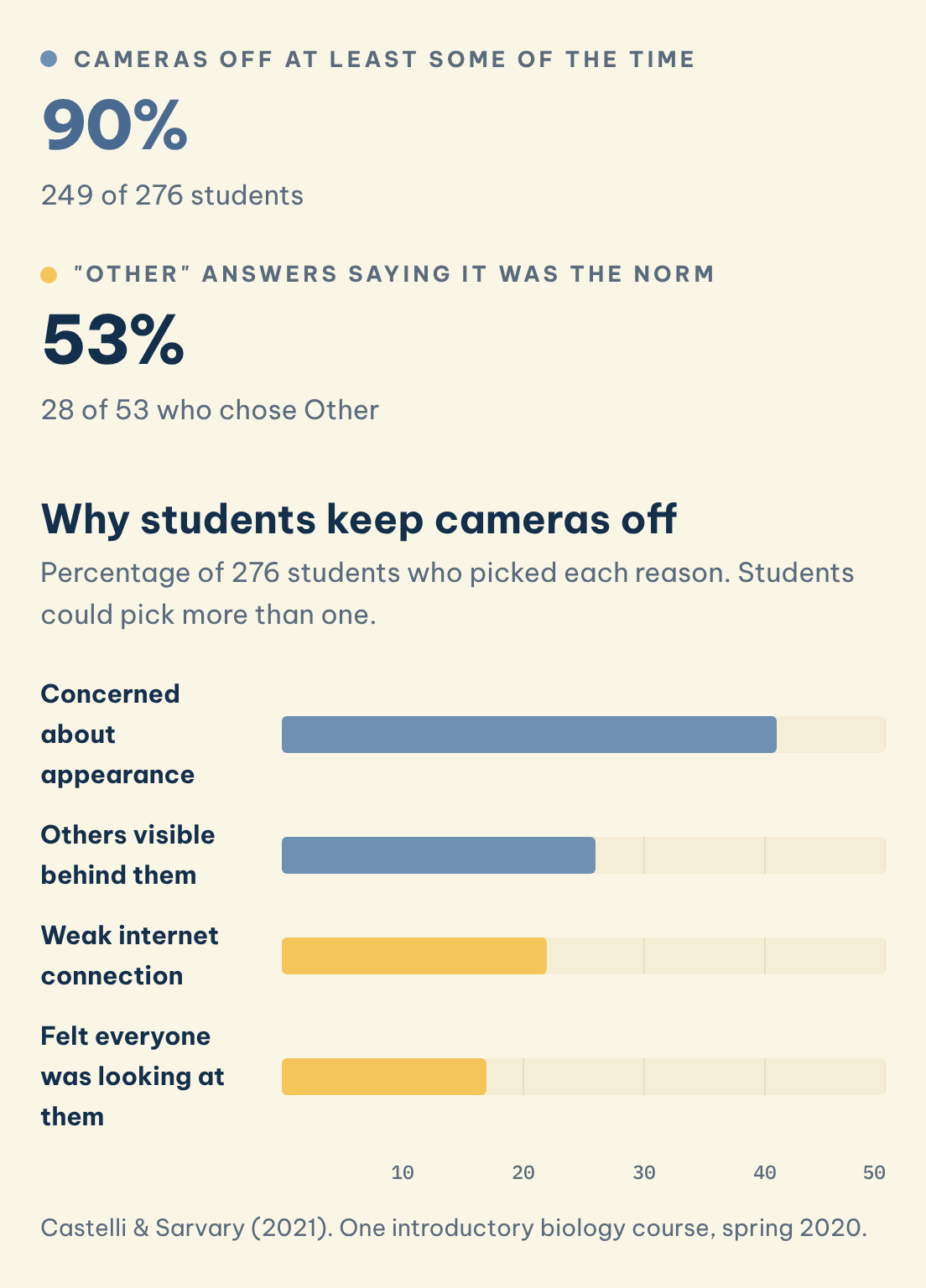
Castelli and Sarvary (2021) surveyed students in an introductory biology course at Cornell in spring 2020, using an end-of-semester questionnaire. Of the 276 students in the final sample, 249 (90%) reported keeping their camera off at least some of the time. Respondents could pick several reasons: 41% were concerned about their appearance, 26% did not want others to see what was behind them, 22% had a weak internet connection, and 17% felt that everyone was looking at them. Webcam failure was cited by only 2%. Of the 53 students who chose "Other", 28 (53%) said that having cameras off was the norm in the class. The authors recommend not requiring camera use, explicitly encouraging it while the norms are set, addressing distractions, using active learning and surveying students about their own challenges. The study is one course at one university, so treat the percentages as a pattern to check with your own group rather than as a national figure (Castelli & Sarvary, 2021). A quick anonymous poll in week one will show which reasons apply to your students.
Cameras off at least some of the time
90%
249 of 276 students
"Other" answers saying it was the norm
53%
28 of 53 who chose Other
Why students keep cameras off
Percentage of 276 students who picked each reason. Students could pick more than one.
Save this figure
◆ Question 3 / 7 · Instructions and breakouts
How do you give instructions and run breakout rooms online?
Direct answer: Say the instruction once, post it in the chat, check it with a short question, then open the room with a timer and a role for each person. Visit each room twice, quickly first and carefully second. Perkins (n.d.) offers these moves in a British Council handout.
Perkins (n.d.) recommends checking instructions with instruction-checking questions and leaving the instructions in the chat so students can return to them once they are in a breakout room. She suggests setting a timer, giving each group member a role such as notetaker, timekeeper or involver, and monitoring the rooms twice (once quickly, once carefully). She also advises giving thinking time before you elicit an answer and grouping learners who share a technical problem, such as no working microphone, so they can use the chat together (Perkins, n.d.). The table below turns these moves into a quick reference.
| Problem | Move | Source |
|---|---|---|
| Students forget the task once in a room | Leave the instruction in the chat | Perkins (n.d.) |
| Groups drift or run over | Set a visible timer | Perkins (n.d.) |
| One student does all the work | Give each member a role | Perkins (n.d.) |
| Teacher cannot see every room | Visit twice: quick pass, then careful pass | Perkins (n.d.) |
| Silence after a question | Give thinking time before eliciting | Perkins (n.d.) |
◆ Question 4 / 7 · Checking understanding
How do you check understanding and keep attention on video?
Direct answer: Check in more often than you would face to face, because body language is harder to read online. Use polls, ask closed questions in the chat and follow up by voice, and add short retrieval tasks. Retrieval practice helps students keep ideas, though it does not replace other assessment.
The British Council (2020) advises that "It's harder to read body language when teaching online. So, check in more frequently with learners on their progress and understanding." The same article notes that concentration dips faster online and suggests polls and surveys, introducing new tools slowly and checking what learners see on different devices (British Council, 2020). Perkins (n.d.) suggests using the chat box for closed questions and then following up with an open question on the microphone, and stopping screen-sharing during speaking activities so students can see one another. The Education Endowment Foundation (2020) reports that retrieval practice and self-quizzing help students retain ideas, while warning that it is not a replacement for other forms of assessment. One pattern to try, which is our suggestion rather than a finding from these sources, is a poll every ten to fifteen minutes, a two-question quiz at the start of each session on the previous one, and one open question per activity that needs a spoken answer. Across the three sources in this section, the common thread is that teachers must create evidence of understanding, because the video grid rarely supplies it.
◆ Question 5 / 7 · Video fatigue
How do you reduce video fatigue in online lessons?
Direct answer: Plan shorter blocks, vary the activity, and give students permission to turn off the self-view. Bailenson (2021) names four possible causes of Zoom fatigue, but he presents them as theoretical arguments, not yet scientific findings, so treat the fixes as sensible trials.
Bailenson (2021) proposes four explanations: excessive close-up eye gaze, cognitive load, increased self-evaluation from staring at one's own video, and constrained physical mobility. He describes the paper as a theoretical argument and says these are not yet scientific findings (Bailenson, 2021). The practical value for a teacher is that each argument suggests a testable adjustment. Bailenson himself suggests reducing the size of the video window, hiding the self-view, and allowing movement or audio-only breaks, and fewer simultaneous tools is a reasonable response to cognitive load. These are untested suggestions, so try one change at a time and ask your students after two sessions whether it helped. This also protects the camera policy above: a student who can hide their own tile may be more willing to leave the camera on. This is our inference, linking Bailenson's self-evaluation point to the 41% appearance concern above, and it has not been tested.
◆ Question 6 / 7 · What the evidence says
What does the evidence say matters most in online teaching?
Direct answer: Teaching quality matters more than the delivery format. The Education Endowment Foundation (2020) rapid assessment found no clear difference between real-time and other forms of remote teaching, and peer interaction can motivate students. The evidence base is limited, as 45 of the 60 reviews it drew on were rated low quality.
The Education Endowment Foundation (2020) based its assessment on 60 systematic reviews and meta-analyses, and it rated 45 of them as low quality. Its authors state that ensuring the elements of effective teaching are present, such as clear explanations, scaffolding and feedback, "is more important than how or when they are provided" (Education Endowment Foundation, 2020, p. 4). They also report that there was no clear difference between teaching in real time and alternatives. Another of its key findings is that peer interaction can motivate learners, and the strategies studied included peer marking and feedback, sharing models of good work and live discussion of content, although many of the studies involved older learners (Education Endowment Foundation, 2020, p. 4). The authors note that the evidence came from contexts that do not closely parallel the circumstances schools faced in 2020 and included many studies in higher education. Our reading is modest: put your effort into explanations, scaffolding and feedback, and treat the tools as secondary. For feedback design in a course assignment, see the EDUC9144 assessment guide.
◆ Question 7 / 7 · Where MAAS fits
Where does MAAS fit for teachers and tutors who teach online?
Direct answer: MAAS recruits tutors and subject experts who teach and mentor students online. If you already run live sessions and want to work with students on academic skills, you can apply on the become an expert page. The page lists the requirements before you apply.
MAAS works with experts who coach students through live video sessions, so the routines in this guide apply to that work: clear norms, instructions in the chat, frequent checks and a camera policy that invites rather than forces. Students who want one-to-one help in a subject can look at the subject tutoring service. If you teach or tutor online and have a discipline that students ask about, read the requirements on the become an expert page and apply there.
Frequently asked questions
How long should an online lesson be?
No source in this guide sets a length. The British Council (2020) notes that concentration dips faster online, so plan shorter blocks with a change of activity and check how your own group copes (British Council, 2020).
Can I require students to turn on their cameras?
Castelli and Sarvary (2021) recommend against requiring camera use and in favour of explicit encouragement while norms are set. Their data show 90% of students kept cameras off at least some of the time, mostly for appearance, privacy or connection reasons (Castelli & Sarvary, 2021).
What is the best way to run breakout rooms?
Perkins (n.d.) suggests leaving instructions in the chat, setting a timer, giving each person a role and visiting every room twice. Check the instruction with a short question before you open the rooms (Perkins, n.d.).
Is live teaching better than recorded teaching?
The Education Endowment Foundation (2020) found no clear difference between real-time teaching and alternatives. What mattered more was whether clear explanations, scaffolding and feedback were present (Education Endowment Foundation, 2020, p. 4).
How do I know whether students understand when I cannot see them?
The British Council (2020) advises checking in more frequently. Polls, chat responses and a follow-up question by voice give you evidence you would otherwise read from body language (British Council, 2020).
Is Zoom fatigue proven?
Bailenson (2021) offers four explanations and states that they are theoretical arguments, not yet scientific findings. Try the adjustments one at a time and ask students whether they help (Bailenson, 2021).
References
Bailenson, J. N. (2021). Nonverbal overload: A theoretical argument for the causes of Zoom fatigue. Technology, Mind, and Behavior, 2(1). https://doi.org/10.1037/tmb0000030
British Council. (n.d.). Managing the lesson. TeachingEnglish. Retrieved October 23, 2026, from https://www.teachingenglish.org.uk/professional-development/teachers/managing-the-lesson
British Council. (2020, May 20). Six tips for running online courses. Voices Magazine. https://www.britishcouncil.org/voices-magazine/moderator-tips-running-online-courses
Castelli, F. R., & Sarvary, M. A. (2021). Why students do not turn on their video cameras during online classes and an equitable and inclusive plan to encourage them to do so. Ecology and Evolution, 11(8), 3565-3576. https://doi.org/10.1002/ece3.7123
Education Endowment Foundation. (2020). Remote learning: Rapid evidence assessment. https://doi.org/10.5281/zenodo.4477022
Martin, F., & Bolliger, D. U. (2018). Engagement matters: Student perceptions on the importance of engagement strategies in the online learning environment. Online Learning, 22(1), 205-222. https://doi.org/10.24059/olj.v22i1.1092
Perkins, L. (n.d.). Maximising interaction in the online classroom [Webinar handout]. British Council TeachingEnglish. https://www.teachingenglish.org.uk/sites/teacheng/files/WEBINAR_HANDOUT_Lauren_Perkins.pdf
Teach or tutor online and want to work with students on academic skills? See how MAAS recruits experts.
Become an expert ▸